

Step 1: Set the context
Every weigh-in starts the same way. loadmate asks for a Reference (your own label, such as the weigher’s name and the month) and a Date. Both are required. You then confirm the Rig Configuration that was weighed and choose the Weigh Method. For this page, choose Mobile weigher as the method. That tells loadmate to lay step 2 out by pass instead of by ticket platform. The rig configuration you pick still decides which passes appear, so set it to match what the weigher actually had on the pads. The full rig-configuration choices are explained on the weighbridge page and the overview; the short version is that loadmate only shows you the passes that make sense for your rig. Set the method to Mobile weigher and move on.Step 2: Choose which passes your report has
A new mobile-weigher record starts with no passes selected. Nothing is filled in yet, and that is by design. You tap each pass that appears on your report to open it, then fill in the pad readings inside. Leave any pass you did not have untouched.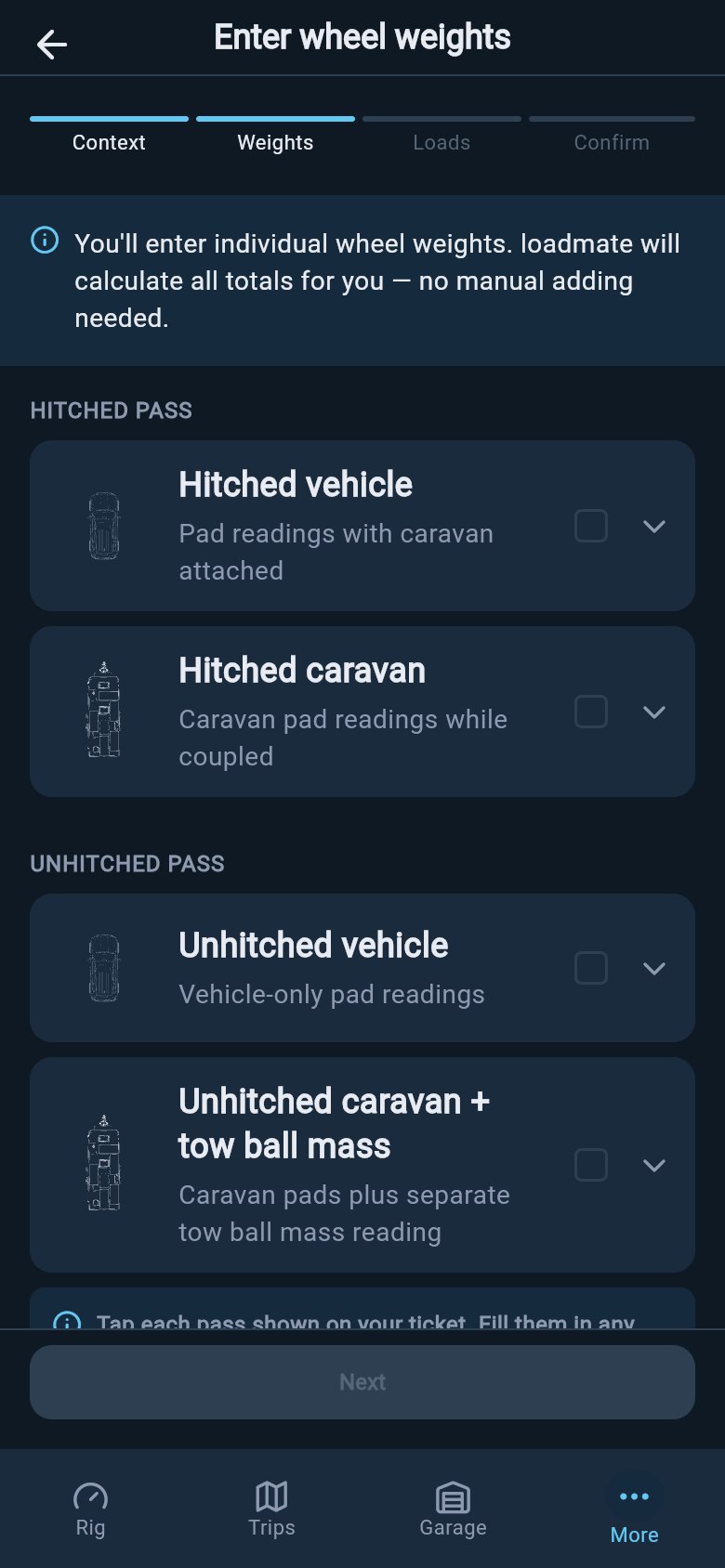
- Has a tow vehicle? The Unhitched vehicle pass (four pads) is required.
- Has a trailer or caravan? The Unhitched caravan + coupling pass (axle pads plus the separate coupling reading) is required.
- Does your report also include readings taken while hitched? Add the optional Hitched vehicle and/or Hitched caravan passes.
- Leave any pass that is not on your report untouched — enter only what was actually measured.
Unhitched vehicle pass
This pass records your tow vehicle on its own, with the caravan unhitched. It has four pad readings, one under each wheel: front-left, front-right, rear-left, and rear-right. If your rig has a tow vehicle, this pass is required, so open it and copy all four readings across.Unhitched caravan + coupling pass
This pass records your caravan on its own. You enter a pad reading for each axle — one, two, or three axles, depending on your van — and then a separate coupling-scale reading. The coupling reading is the weight pressing down where the van meets the tow ball, entered using your regional label: tow ball mass (AU), nose weight (UK), or tongue weight (US). loadmate keeps that separate coupling reading as its preferred coupling value, because a dedicated coupling scale measures it directly rather than working it out from the other pads. If your rig has a trailer or caravan, this pass is required.Hitched passes (optional)
Some mobile weighers also take readings while your rig is hitched together. If your report includes those, open the Hitched vehicle and Hitched caravan passes and enter what they show. If your report does not include hitched readings, leave these passes closed. They are optional, and there is no need to invent figures to fill them.Entering pad readings
Inside each pass, loadmate shows a diagram with a field for every pad. Work through it one figure at a time and type each reading exactly as it appears on your report, in your regional units. There is nothing to calculate; the group totals are worked out for you from the pads you enter. As you type, loadmate quietly checks that the left and right sides of an axle look sensible together. If one side reads a lot heavier than the other, it flags the difference as something worth a second look before you tow — usually it points to a mistyped figure or a genuine side-to-side imbalance you would want to know about. It is a gentle prompt, not a verdict. Re-check the reading against your report; if the report really does show that difference, the warning has done its job by surfacing it.Check the Solo vs Hitched summary
Once your passes are filled in, loadmate shows a Solo vs Hitched summary table that pulls the readings together so you can confirm everything landed in the right place. Read it from top to bottom and check each row against what you expected. The table shows:
Confirm that each pass mapped to the row you expected: the vehicle total should reflect your vehicle pass, the caravan total your caravan pass, and the coupling weight should match the separate coupling reading you entered. If a row looks wrong, go back into the relevant pass and re-check the pads before you continue. Catching a mis-entry here is far easier than spotting it later.
Next: cross-check and link your loads
With your passes entered and the summary confirmed, the flow moves on to telling loadmate which loads were on the rig when it was weighed. That step is what makes this a faithful baseline rather than just a set of numbers. Continue to cross-check and link your loads.loadmate helps you work from the numbers you enter. Keep your source documents handy, and use a weighbridge, truck scale, or local authority when you need official evidence.