

Read the missing-data line
When the score is locked, open the Rig tab and read the line under the gauge. It names what is missing, such as your plate values or your storage zones, and it is the fastest way to know where to go. That line is a tap-to-fix shortcut: tapping it takes you straight to the screen that collects the missing input, so you do not have to hunt through menus to find the right place. Read the named line as a setup task, not a result. A locked gauge means loadmate has chosen not to invent an answer, which is the opposite of a fault. It is also distinct from a score of zero: a zero is a scored result, usually a rig that has crossed a hard limit, while a lock is the absence of a score because a core input is still missing. If you see a real number that is simply very low, that is a scored result and the score-changed page will help you trace it. If you see a locked gauge with a named line, stay here.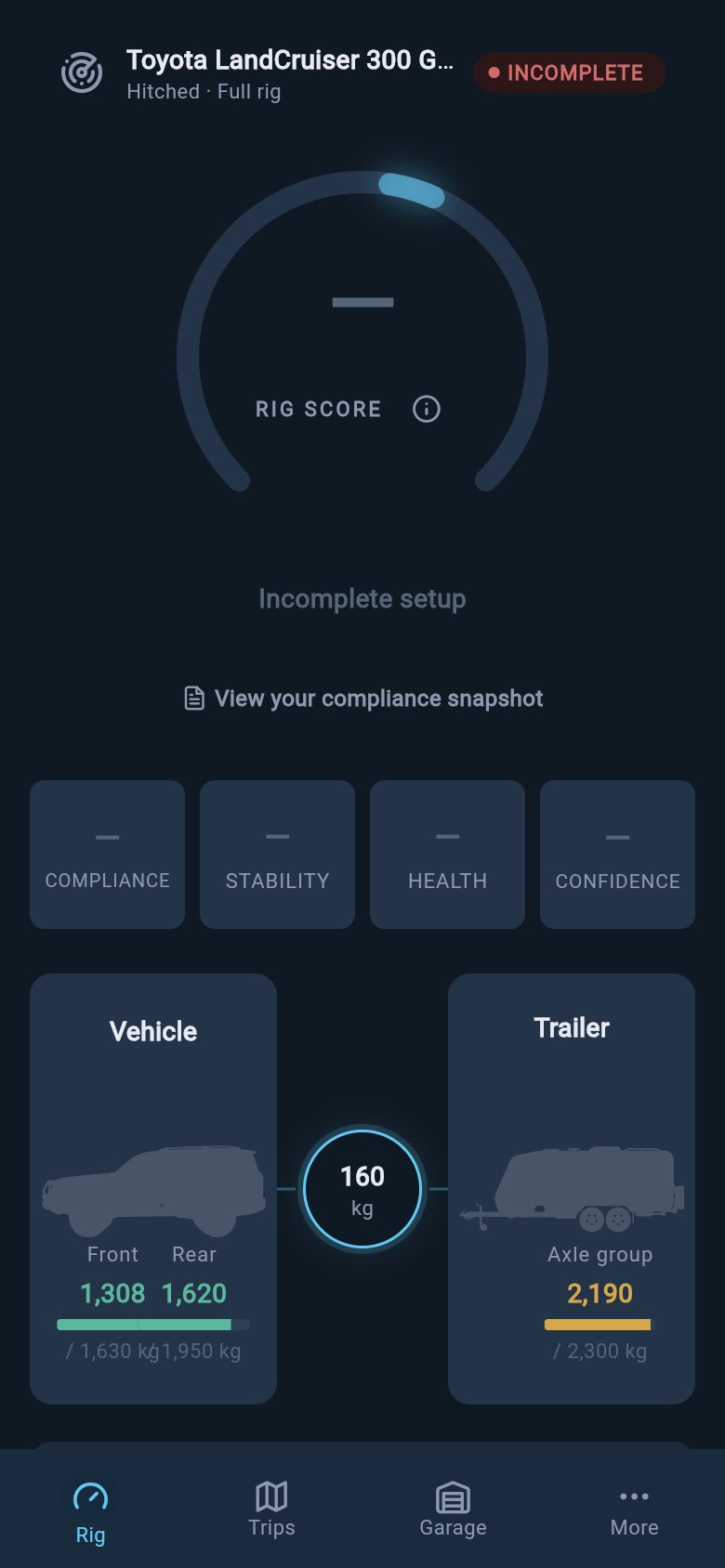
A locked score points you to the missing setup input instead of guessing.
Inputs that can lock the score
A small set of core inputs decide whether the gauge can render at all. If any of them is missing, the score locks until you provide it. None of these is loadmate being fussy: each one is a figure the score genuinely cannot work accurately without. The first group is your plate or rating values for the tow vehicle. These are the most your loaded tow vehicle is allowed to weigh, the most your vehicle and trailer together are allowed to weigh, and the most you may tow with trailer brakes fitted (in Australia GVM, GCM, and braked towing capacity; in the UK MAM, GTW, and the maximum towing limit; in the US GVWR, GCWR, and towing capacity; in Europe/international GVWR, GCWR, and towable mass). You will find these on the vehicle’s compliance plate or in the handbook, and you enter them as printed. The second is a baseline weight for the rig, which is the starting weight your loads are added against, so the score has something solid to measure from. The strongest source for this is a professional weigh-in, which gives you measured numbers rather than estimates, although a weigh-in is not the only way to provide one. The third group only applies when you are hitched: the score also needs the trailer’s laden limit (ATM in AU, MTPLM in the UK, Trailer GVWR in the US, or GTWR in Europe/international), a trailer baseline weight, and storage zones set up on both the vehicle and the trailer. Storage zones tell loadmate where weight sits, which is what the stability checks depend on, so until both sides have zones the hitched score stays locked. Not every gap locks the gauge, though. Many optional or out-of-date inputs lower confidence instead, so the gauge still shows a number, just a lower and more cautious one. Adding or refreshing that data lifts the score rather than unlocking it.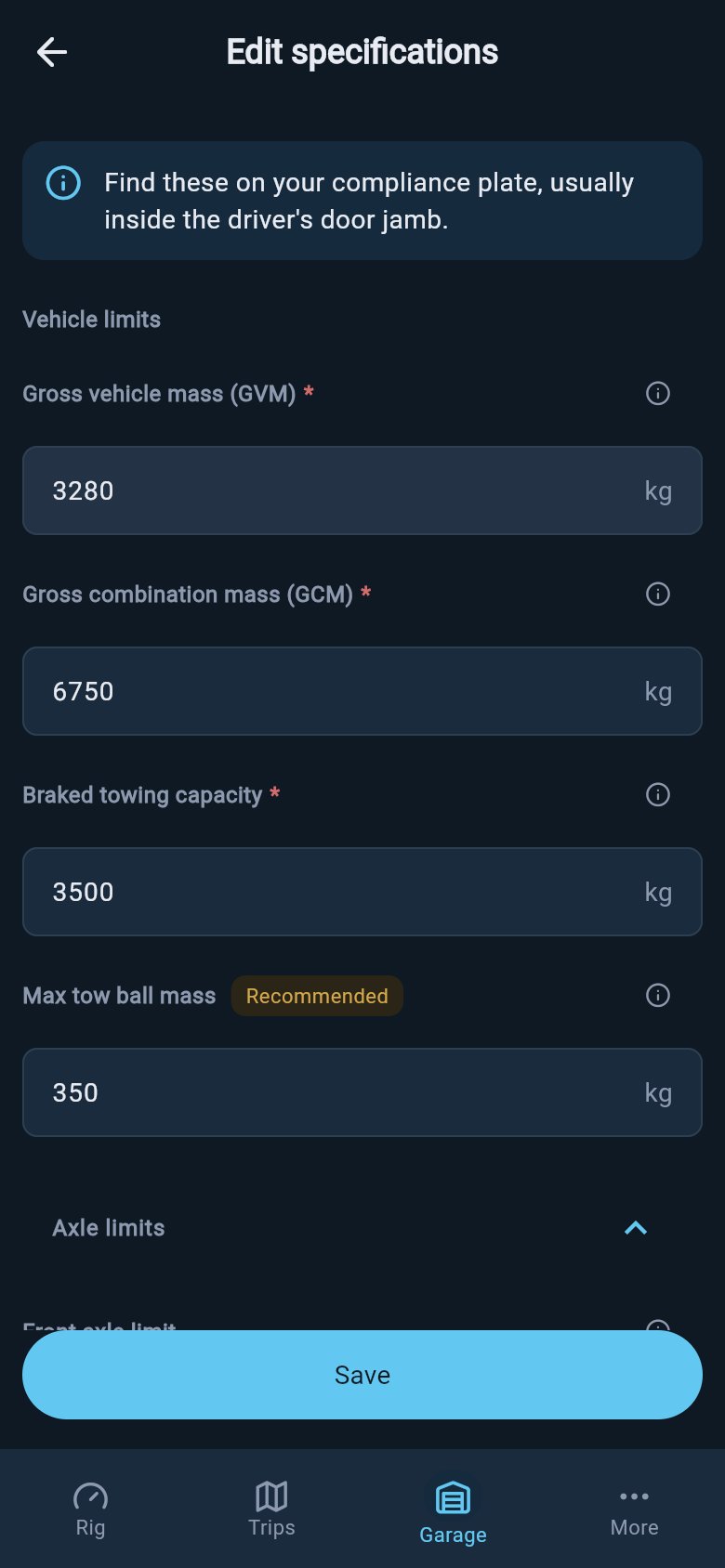
The missing-input prompt leads back to the rating fields that feed the score.
Fix a locked score
Each missing input has a home screen, and the tap-to-fix line usually takes you straight there. The recovery is one tap and one accurate entry, so you rarely need to navigate yourself.1
Open Rig and read the line under the locked gauge
On the Rig tab, read the line below the gauge. It names exactly what is missing, whether that is a plate value, a baseline weight, a trailer limit, or storage zones.
2
Tap the line to jump to the right screen
Tap the named line. loadmate takes you to the screen the line takes you to, which is the one that collects that missing input, so you land in the right place without searching.
3
Enter the value exactly as printed
Enter the named plate value, baseline, trailer laden limit, or storage zones as they appear on your plate, paperwork, or weighbridge slip. Save from that screen.
4
Return to Rig and let it render
Go back to the Rig tab. With the missing input in place, the gauge renders a real score from your updated data.
Use Compliance Snapshot for legal-limit context
The Compliance Snapshot is a legal-limit view that reads your current data and shows your weights and margins against each limit, such as the loaded vehicle limit, the combination limit, the trailer laden limit, the axle limits, and the coupling weight. Once loadmate has your vehicle limits and a baseline, it can render those legal-limit rows even while the overall score is still locked on something else, such as storage zones. So if your only remaining gap is zones, you still get a limits read from the locked Rig screen. If the lock is because the plate values or the baseline themselves are missing, the snapshot link is not there yet, because the rows it needs are exactly what is missing. Fix that first: the line under the gauge points you to the screen that collects it. Once those limits and the baseline are in, the snapshot becomes available from the gauge. Compliance Snapshot is free for everyone, including demo and lapsed users. It shows you the rows; it does not interpret the legal rules for you or decide whether you are road-legal, so read the margins yourself and treat them as the figures, not a ruling. To learn how the gauge and its inputs fit together, see What is Rig Score.Where to go next
Edit ratings
Where the plate-rated limits for your vehicle and trailer live, so you can enter or correct them as printed.
Record a weigh-in
Capture a measured baseline from a weighbridge or mobile weigher, the strongest source for the figure the gauge needs.
Set up storage zones
Tell loadmate where weight can sit on the vehicle and trailer, which the hitched stability checks depend on.
What is Rig Score
How the gauge, its inputs, and the locked state fit together, in plain language.
Reading the locked-state line and Compliance Snapshot is free for everyone, including demo and lapsed users. The snapshot appears from the locked gauge once loadmate has your vehicle limits and a baseline, so if the lock is only about storage zones you still get a legal-limit read; if those limits or the baseline are what is missing, fix that first and the snapshot becomes available. Saving the missing input writes your own data (ratings, baseline, storage zones) and needs Pro, and a demo rig may show a locked or worked example state you cannot edit out. A lock loses nothing: it is loadmate declining to show a number it cannot stand behind, and everything you have already entered is still there waiting once the gauge can render.