

Open Compliance Snapshot
Go to the More tab and choose Compliance. You can also reach it from the Rig Score help sheet, from prompts on a low or locked score, and from links in the score breakdown. However you arrive, it is the same screen: a table of every legal-limit check loadmate can work out from the numbers on your rig. You do not have to pay to read it. The snapshot is open to everyone — free, lapsed, and demo users alike. More on that below.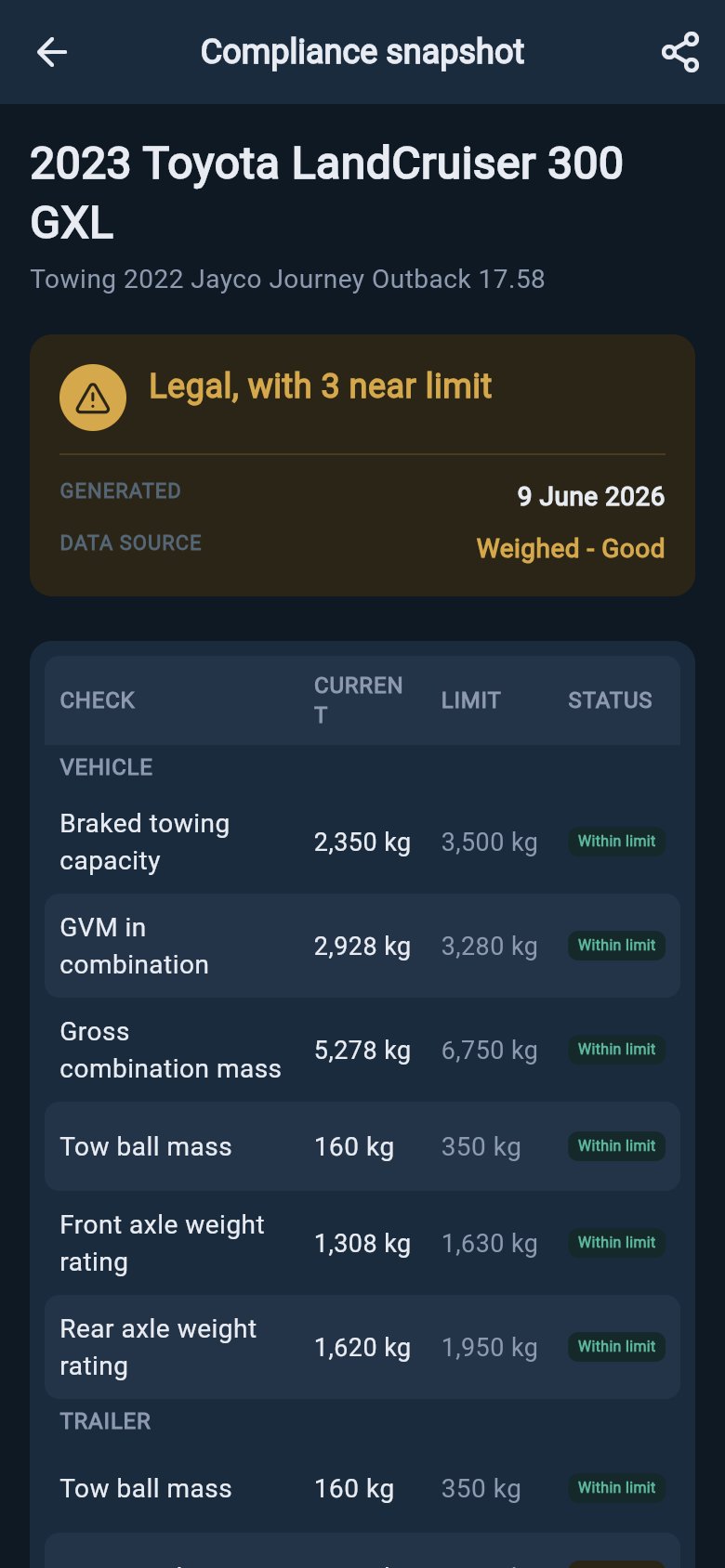
Compliance Snapshot table
How to read the table
Each row is one legal limit. Reading across, you see five things:- Check — the name of the limit, in your region’s wording.
- Current — what your rig actually weighs against that limit right now, the way it is loaded.
- Limit — the rated figure you entered from the plate, label, manual, or a measured record.
- Margin — the headroom left: how much more you can add before you reach the limit. This is the number to watch.
- Status — a short label and a colour: Within limit (green), Near limit (amber, getting close), or Exceeded (red, over the limit).
What each row checks
Which rows appear depends on your setup and whether you are hitched to a trailer. The names change with where you tow, so each one below is shown with its regional wording.Your tow vehicle
- Vehicle weight — how heavy your loaded tow vehicle is against its own ceiling. Your region calls this GVM (AU), MAM (UK), or GVWR (US and Europe/international): the most your loaded vehicle is allowed to weigh. When you are hitched, this row accounts for the weight pressing down through the coupling onto the vehicle.
- Combined weight — the tow vehicle and trailer added together against the pair’s ceiling: GCM (AU) or GCWR (US), also called Gross Train Weight in the UK. This is the heaviest the whole rig may be.
- Towing limit — how heavy a braked trailer your vehicle is rated to pull. Loaded trailer weight is checked against this.
- Front axle and rear axle — the load carried by each axle against what that axle is rated to take.
- Coupling load on the vehicle — the down-weight the trailer puts on the tow ball, checked against what your vehicle and hitch are rated to carry. This is tow ball mass (AU), nose weight (UK), or tongue weight (US).
Your trailer or caravan
- Trailer weight — how heavy your loaded caravan or trailer is against its ceiling: ATM (AU), MTPLM (UK), Trailer GVWR (US), or GTWR (Europe/international). This is the most your loaded trailer may weigh.
- Trailer axle weight — the weight sitting on the trailer’s own wheels, against its axle-group rating. In Australia this is the trailer’s GTM.
- Coupling load at the trailer — the same nose or ball weight, read from the trailer’s side.
Australia references
GVM, ATM, GTM, GCM, tow ball mass — what each term means and where to find it.
United Kingdom references
MAM, MTPLM, nose weight, Gross Train Weight — UK plate and label wording.
United States references
GVWR, GCWR, tongue weight, GAWR — US sticker and manual wording.
Europe references
GVWR, GTWR, GCWR, coupling load, and metric units for European rigs.
A worked example: reading one row’s margin
Margin is just the gap between where you are now and the limit you are allowed. Here is the Trailer weight row for an Australian caravan, read across:
Read it as a sentence: “My loaded van currently weighs 2,650 kg. Its ATM limit is 3,000 kg. I have 350 kg of margin — that is how much more I can load before I reach the limit.” The status reads Within limit because there is comfortable room left.
Now picture loading 400 kg of water, gear, and supplies into that van. The Current figure climbs past 3,000 kg, the Margin turns negative, and the status flips to Exceeded. Same row, very different reading — and a clear sign to take weight back out before you hitch up.
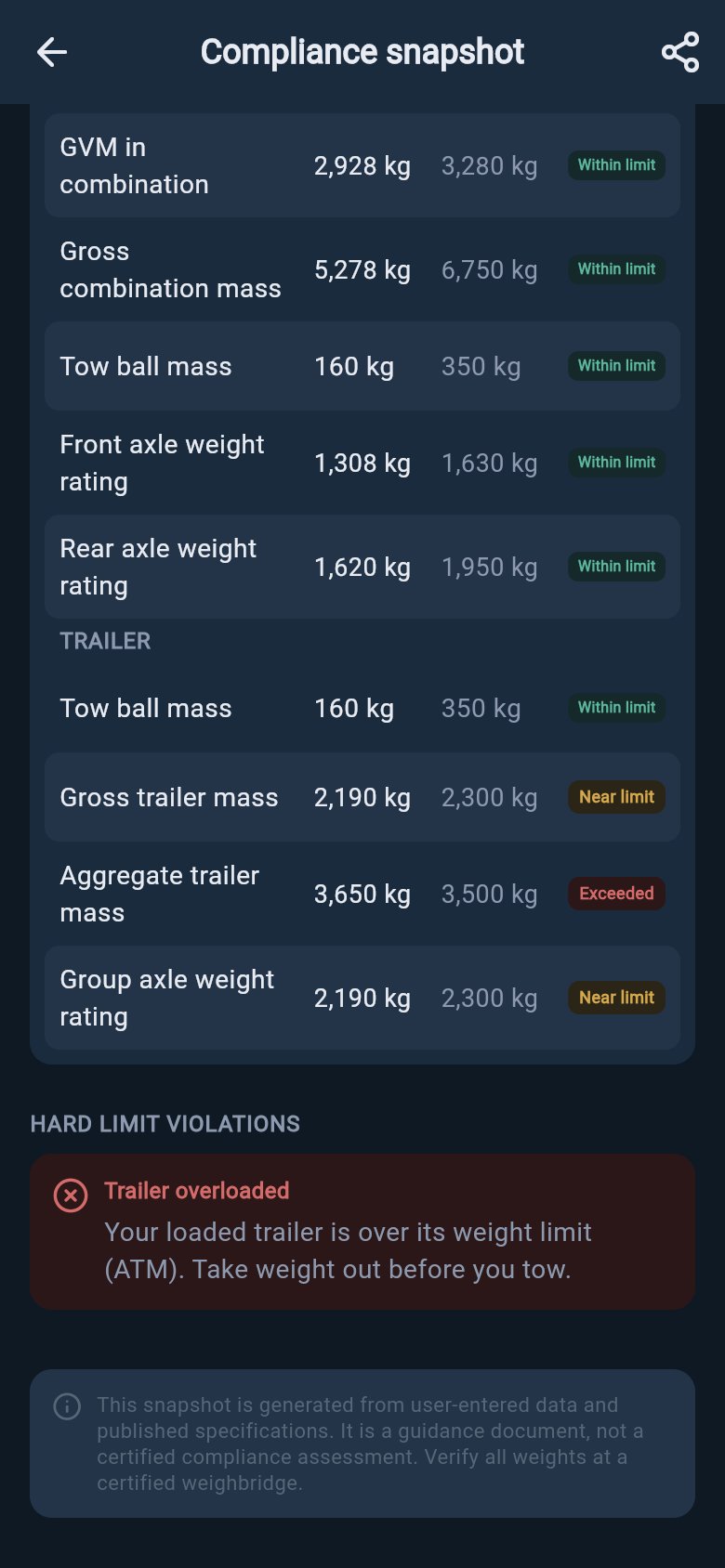
An Exceeded row reads red
Margin is your friend, not a target. Loading right up to a limit leaves you nothing for a full water tank, a wet awning, or the shopping you pick up on the way. A healthy margin is room you keep on purpose.
Why margin matters on the road
These are not paperwork numbers. Each limit exists because something physical is at stake.- Less margin means longer stopping. A heavier rig pushes brakes, drivetrain, and cooling closer to their design edge. Stopping distances grow, and long descents heat the brakes faster.
- Axle and tyre limits protect your running gear. An overloaded axle overworks its tyres and bearings and changes how the rig steers and brakes. Overloaded tyres run hot, and a hot tyre is the most common cause of a towing blowout.
- The coupling load is a balance, not just a ceiling. Too little weight on the tow ball lets a tail-heavy van wag the car and start to sway. Too much lifts the front of the vehicle, lightens the steering, and squats the rear. There is a sweet spot, and both the too-low and too-high ends matter.
When a row reads “No limit” or is blank
A row shows No limit in the Limit column, an em dash in the Margin column, or does not appear at all when loadmate does not yet have the rated figure it needs to do that check. This is not a fault — it simply means a number is missing from your setup. The usual gaps are:- A plate limit not yet entered for the vehicle or trailer.
- A baseline weight missing, so loadmate does not know what the asset weighs before you load it.
- Storage zones not set up, so loads have no place to sit and cannot be totalled.
- No hitched context yet, for a check that only applies while you are towing.
It is open to everyone — not an upgrade path
Compliance Snapshot is free to read. You can open it and study every row as a free, lapsed, or demo user, and you can share or export the snapshot as a PDF for your records or a roadside check. It is not a feature that asks you to upgrade. If reading a row makes you want to fix something — move a load, correct a rating, or record a weigh-in — that fix follows the normal rules for that part of the app, and saving a change to your own rig is where Pro comes in. The snapshot itself never gates the view.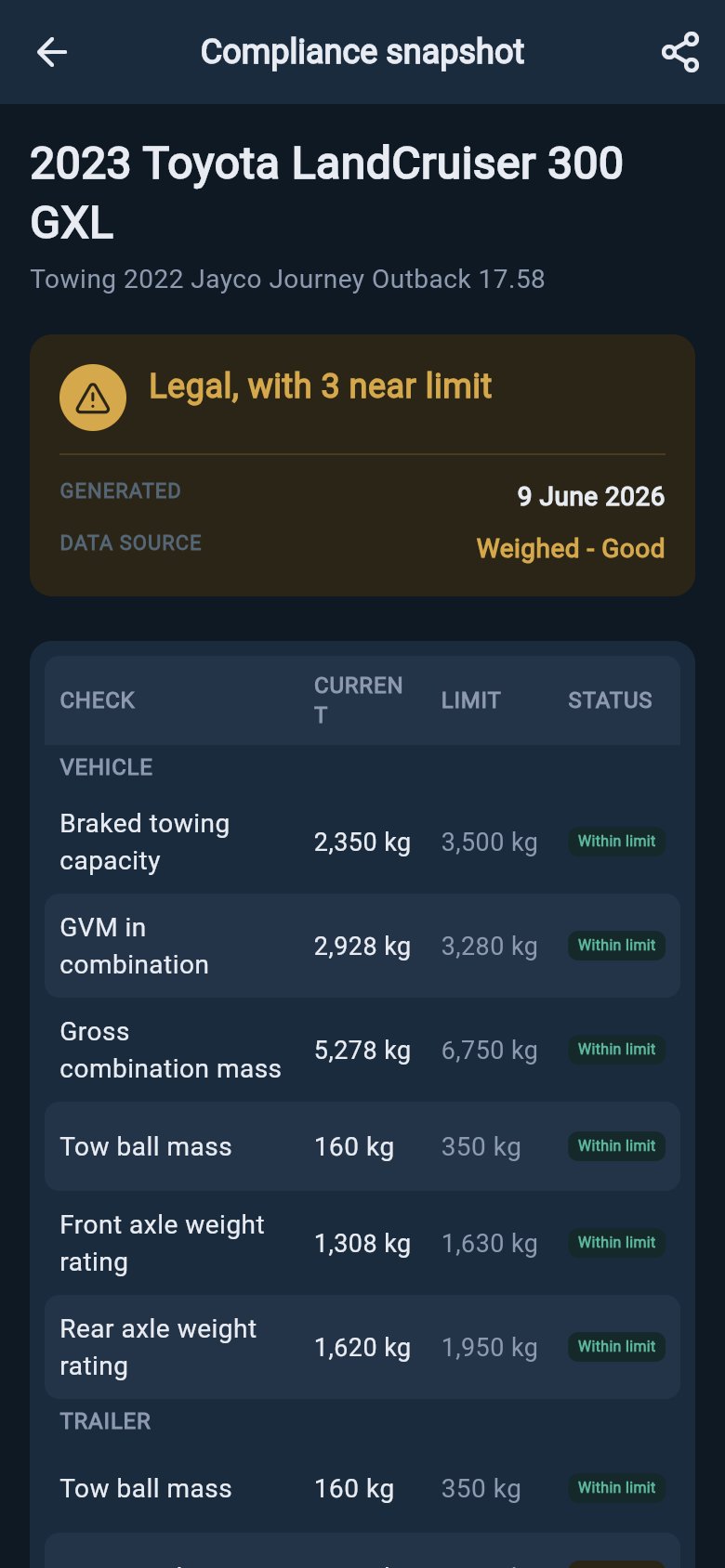
Export the snapshot
How it fits with your Rig Score
The Rig Score is the headline. Compliance Snapshot is the legal-limit detail behind it — the rows that decide whether your rig is within its weights. The other parts of the score, how the rig handles and the health of its parts, are covered in the score breakdown. So use the two together:What is the Rig Score?
The headline number and what it does and does not mean.
The score breakdown
Compliance, stability, health, and confidence, each in plain words.
Why your score changed
If the number moved and you are not sure why, start here.
Glossary
Every towing term — GVM, ATM, nose weight — spelled out in your wording.
loadmate helps you work from the numbers you enter. It reflects your figures and the rules it can apply to them; it does not tell you what is legal or safe to tow. Keep your source documents handy, and use a weighbridge, truck scale, or local authority when you need official evidence.