

It mostly stays current on its own
You do not have to log the odometer as a separate chore. It comes along for the ride with the things you already do: when you log a service, complete a maintenance task, or finish a planned trip, the reading you enter — or the distance from the trip — is carried through to your main odometer for you. In everyday use, that keeps the reading roughly in step with your travels without any extra effort. Between those moments, loadmate estimates your reading for you by adding up the distance of the trips you have finished since you last entered one. It marks an estimated figure as Estimated, so you always know whether a number was measured or worked out. There is more on how that estimate works, and when loadmate nudges you to refresh it, on Odometer reminders and estimates.loadmate only ever moves your odometer forward. If a reading comes in lower than the one already recorded, it is kept safely in your history rather than winding your current figure back. You can see how that works, and how to fix a reading that looks wrong, on Your odometer history.
Update it directly when needed
Sometimes you will want to set the reading by hand — after a long drive you did not record as a trip, when you first set your rig up, or simply when loadmate prompts you. You do this on the Update odometer sheet. Open it from the maintenance hub (the More tab, then Service & Tasks), or tap Update straight from a reminder when one appears.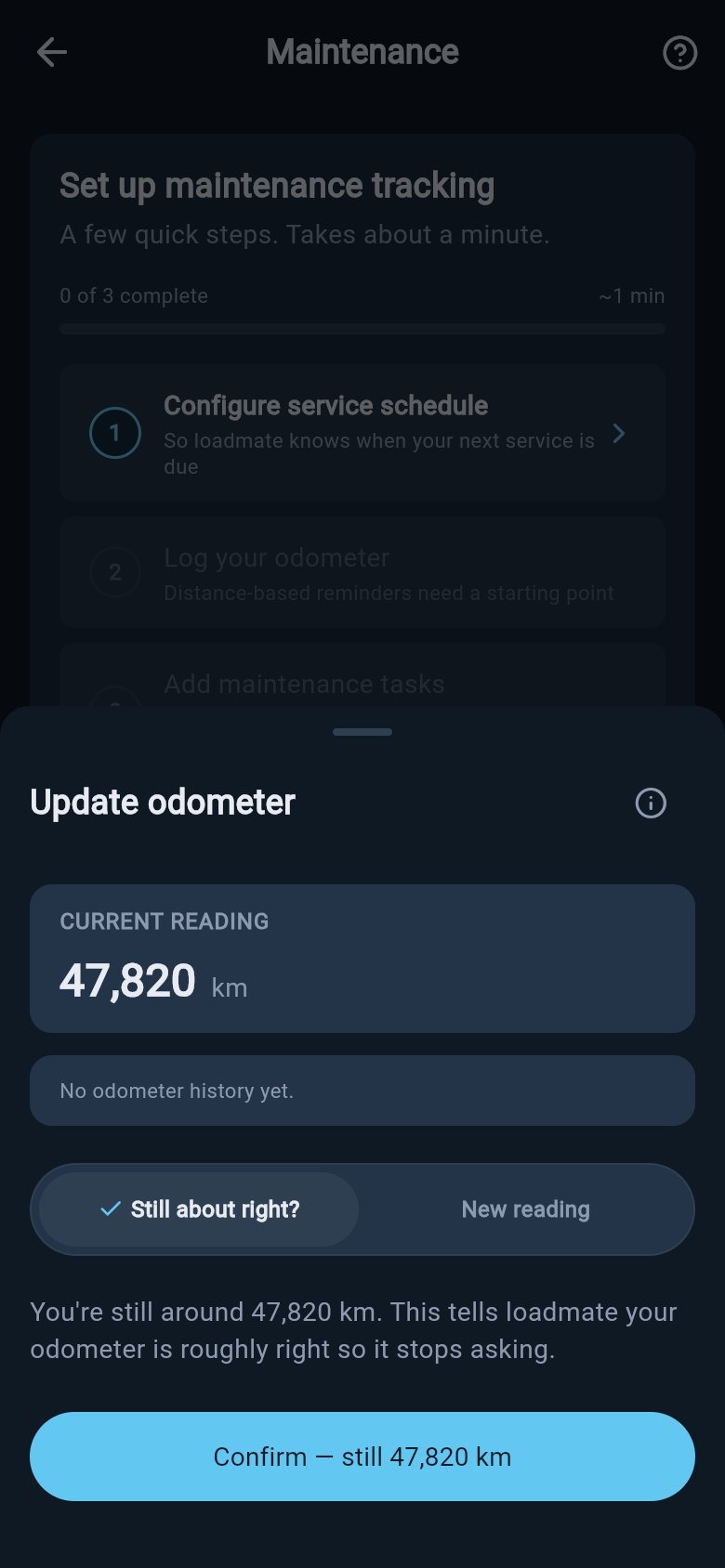
1
Still about right?
Choose Still about right? when the figure on screen already looks correct — for example when loadmate is showing a trip-based estimate that matches your dashboard. You confirm it with a single tap on the button, which reads Confirm — still 78,234 km with your own reading in place of that example. This freshens the date on your reading without changing the number, which is all loadmate needs to know the estimate is good.
2
New reading
Choose New reading to type the exact number from your dashboard. If you are entering a figure you read on an earlier day, set the Reading date underneath; a date in the future is not accepted. This records a precise reading and is the most accurate way to bring things up to date.
Looking at the odometer sheet, your current or estimated reading, and your recent history is open to everyone — free, lapsed, or exploring the demo rig. Saving an update on your own rig is a Pro feature, like the other changes you make in maintenance. The demo rig’s figures are real but fixed, so they are there to explore rather than edit.
Where to go next
A current reading is the foundation for everything distance-based in loadmate. Once it is fresh, these pages show what it feeds into.Your odometer history
See every reading loadmate holds, where each one came from, and how to fix one that looks wrong.
Odometer reminders and estimates
Understand when loadmate nudges you to refresh the reading, and how it estimates in between.
Set a service schedule
Set your service interval by distance, time, or whichever comes first, so loadmate can count down.
Pre-trip checklist
Confirm the odometer before a big trip so your pre-trip checks project forward from a real number.