

Choose region
Choose your region first. Region changes the units and terms you see, so the fields match the plate, manual, or seller paperwork in front of you. Australia, United Kingdom, United States, and Europe are supported. For region terms, use the regional reference pages or the Glossary. If a label does not match your paperwork, pause and check which rating the document is using before you enter the number.Enter the required values
Start with the four values loadmate needs for the basic check:- Tow vehicle loaded limit: GVM, MAM, or GVWR.
- Tow vehicle braked towing capacity.
- Trailer loaded limit: ATM, MTPLM, trailer GVWR, or GTWR.
- Trailer empty weight: tare, dry weight, or MRO.
Add optional values
The optional fields make the result more complete. They are not just nice-to-have notes:- Vehicle name and trailer name help you recognise a saved comparison later.
- Kerb or curb weight helps loadmate estimate how much vehicle payload remains.
- GCM, GTW, or GCWR lets loadmate check the combined vehicle and trailer limit.
- Tow ball, noseweight, tongue, or hitch rating lets loadmate check the coupling limit.
- Expected loaded tow ball, nose, or tongue mass lets loadmate check what the trailer is expected to put on the coupling.
- Water tank capacity lets the planner model empty, part-full, and full water.
Enter loaded tow ball mass carefully
The expected loaded tow ball, nose, or tongue mass is the weight the loaded trailer is expected to place on the vehicle coupling for the trip you are planning. It is not the vehicle’s tow ball limit, not the hitch rating, and not usually the ball mass printed for an empty or tare trailer. This matters because entering the limit can hide an overload, and entering an empty/tare ball mass can understate the real load once water, gas bottles, batteries, food, tools, bikes, or front-boot gear are added. The best source is a measured loaded coupling weight. A trusted loaded estimate is better than a brochure empty figure. If you do not know the loaded value, leave the field blank. loadmate will estimate it from the trailer loaded limit using a regional default, but the estimate is only a planning fallback. Replace it with a measured or better supported value when you can.Include water tanks
Add water tank capacity if the trailer or caravan has one. Water is heavy enough to change the result: roughly 1 kg per litre, or about 8.3 lb per US gallon. The capacity field is the tank size. The planner later uses that capacity with a fill-level slider, so you can compare empty, part-full, and full-water scenarios without changing the trailer’s fixed specs.Read the result
The result screen gives a high-level answer first, then shows the checks underneath. Treat the top result as a summary, not the whole answer. The load limit tells you the practical headroom for the setup you entered. If one limit is tight, loadmate shows the limiting area so you can see what is holding the pair back before you add people, water, or gear. The five checks are:- Towing capacity: whether the trailer loaded limit fits within the vehicle towing limit.
- Coupling weight: whether the expected loaded tow ball, nose, or tongue mass fits the vehicle or hitch limit, when that limit is entered.
- Vehicle loaded limit: whether the vehicle can carry its own kerb or curb weight plus coupling load.
- Combined limit: whether the vehicle and trailer fit within GCM, GTW, or GCWR.
- Trailer loaded limit: whether the trailer’s empty weight leaves useful room under ATM, MTPLM, trailer GVWR, or GTWR.
Use the planner
The planner appears after you enter enough advanced details for loadmate to model a loading scenario. It is where the research check becomes more practical: instead of only asking whether the pair works on paper, it shows what happens as people, gear, and water are added.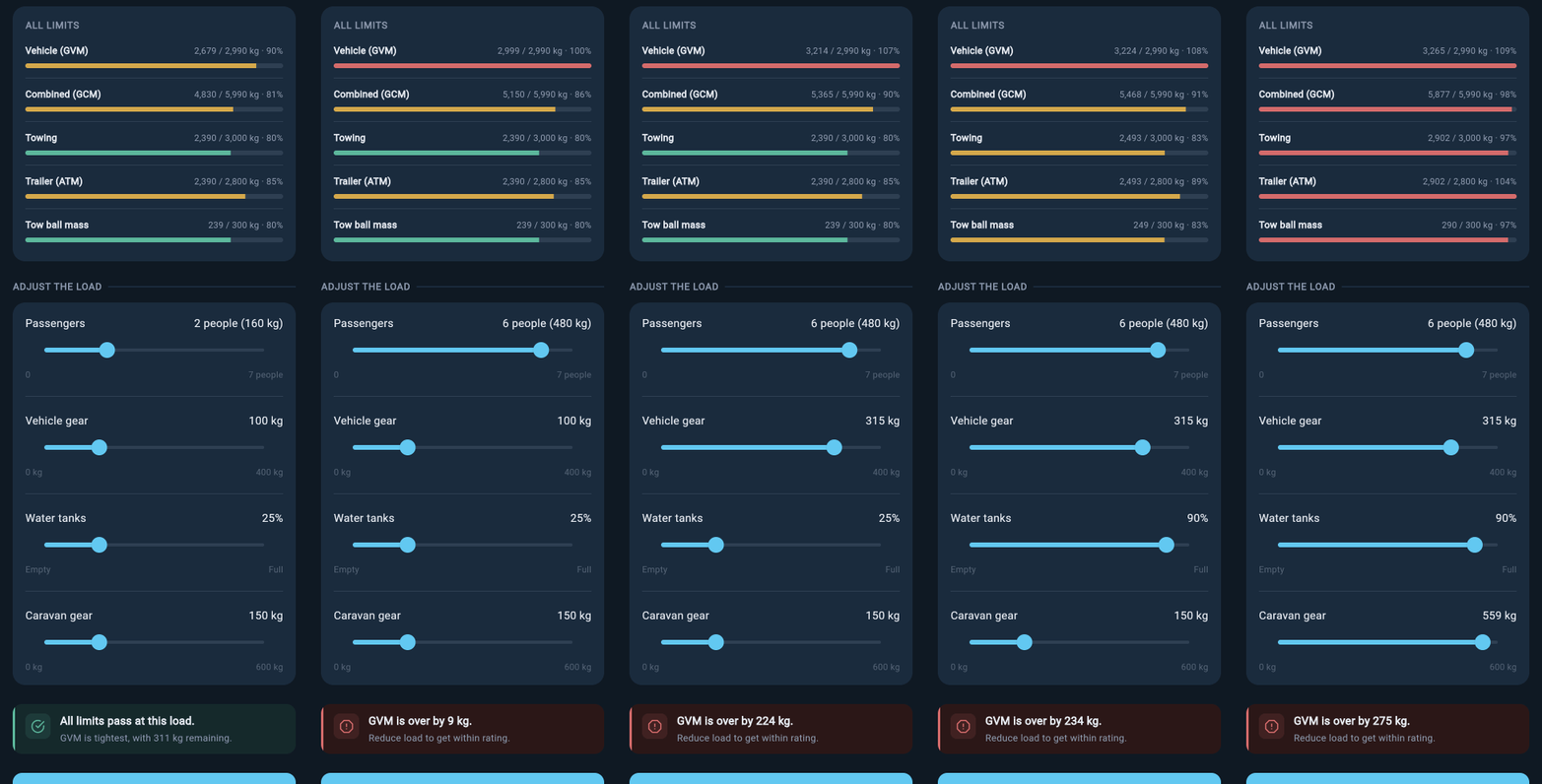
Research planner sliders
- Passengers adds people in the tow vehicle.
- Vehicle gear adds luggage, tools, or other gear carried in the vehicle.
- Water changes the trailer tank fill level, but only appears when water tank capacity was entered.
- Caravan or trailer gear adds load carried in the trailer.
Check stability
The stability check is an advanced Research step. It uses planning inputs, so treat the result as a way to understand how the expected coupling load affects the vehicle before you move on to measured setup work. It needs three values from you:- Wheelbase.
- Rear axle rating.
- Hitch overhang.
Read the stability result
The stability result is built to be read in order:- The story card explains the result in plain language.
- The axle loads card shows the estimated front and rear axle effect.
- The factor insight explains the main reason behind the result.
- The WDH advisory appears when a weight distribution hitch may help the rear-axle picture.
- The confidence pill tells you how much of the result is based on entered data rather than missing or estimated values.
Save comparisons
Saved comparisons let you return to a vehicle and trailer pair without entering every value again. They are useful when you are comparing several trailers or when you want to discuss the numbers with a partner, seller, fitter, or inspector. Use Try another to reset the current check and start a new combination. Saved comparisons are deleted one at a time from the saved list: swipe a comparison left, or open the card menu and choose delete. Deleting a comparison cannot be undone. If you use Research without signing in, saved comparisons live on that device only. They are not transferred to your other devices and are not backed up to the cloud. You may lose them if the app is uninstalled, app data is cleared, browser or device storage is reset, or the device is replaced. Create an account before relying on saved research as a long-term record.Turn a comparison into your rig
When you are ready to proceed, Make this my rig or Set up full profile starts the conversion bridge. The final save in that bridge requires Pro. The bridge gives you a head start, not a finished rig setup. loadmate creates base vehicle and trailer assets from the selected specifications and creates the active setup that pairs them together. After conversion, review the setup before relying on it:- Confirm the vehicle and trailer specs and fill in anything still missing.
- Check baseline weights, especially if any values came from brochures or estimates.
- Set up storage zones so loadmate knows where gear sits. See Set up storage zones.
- Review any loads created from the planner sliders. Assign them to the right storage zones, or delete them and rebuild your load list to match your actual rig.
- Recheck tow ball, nose, or tongue weight once the real setup is loaded.
loadmate helps you work from the numbers you enter. Keep your source documents handy, and use a weighbridge, truck scale, or local authority when you need official evidence.